WDAC Bypass
WDAC is Microsoft’s application control framework. It decides what is allowed to run on Windows including executables, scripts, drivers blocking everything else by default; and you should be using it. It enforces trust based on digital signatures, paths, or hashes, and does so at the kernel level through Code Integrity.
It evolved from Device Guard and replaced AppLocker as Microsoft’s main strategy for code execution control. A dive into WDAC violations will its own hunt.
WFAD block, audit and load events can be viewed in Defender through:
WDAC policies found in user directories indicate local creation either through WDAC wizard, externally downloaded or through 3rd party tools. The default folder path for WDAC wizard creation is C:\Users\Username\Documents\. WDAC single policy always follows the same naming convention SiPolicy.p7b.
DeviceFileEvents
| where FileName =~ 'SiPolicy.p7b'
| where FolderPath has @"C:\Users\"
| where InitiatingProcessAccountDomain !~ 'nt authority'
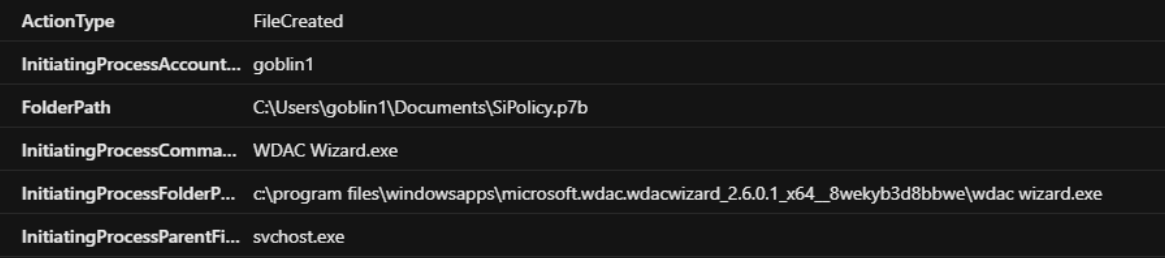
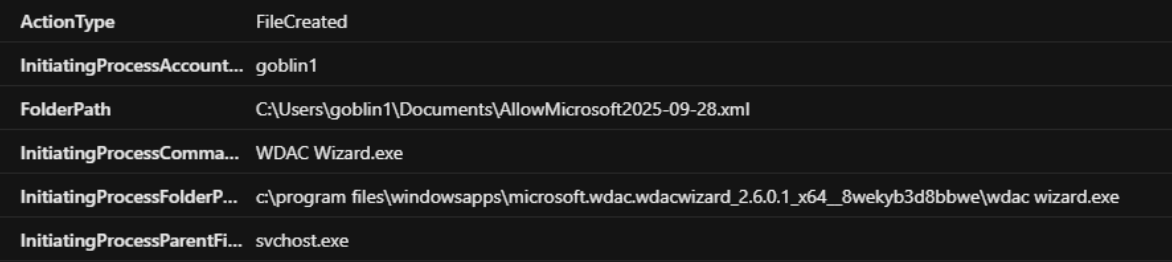
WDAC policies are applied at the following directories:
Single policy:
C:\Windows\System32\CodeIntegrity\SiPolicy.p7b
C:\Windows\System32\CodeIntegrity\*.xml
Multi policy:
C:\Windows\System32\CodeIntegrity\CiPolicies\Active\{PolicyGUID}.cip
Applying file policy from user level processes indicate interactive local WDAC modification.
DeviceFileEvents
| where ActionType in ('FileRenamed', 'FileCreated')
| where FolderPath has_any(@"C:\Windows\System32\CodeIntegrity\", @"C:\Windows\System32\CodeIntegrity\CIPolicies\Active")
| where InitiatingProcessAccountDomain !~ 'nt authority'
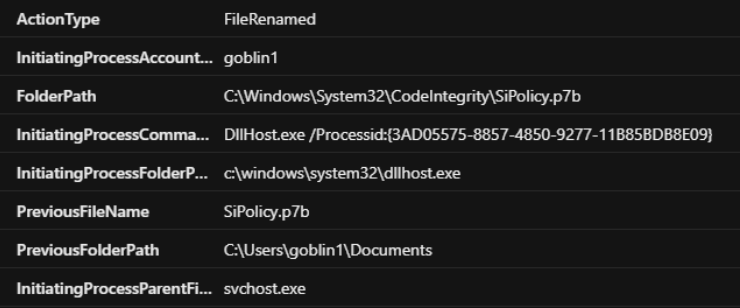
WDAC policies are typically deployed through GPO or Intune to multiple endpoints. Instances of unique policies applied to single hosts could indicate bespoke policies that differ from enterprise standard. However, applying polices by interactive methods did not trigger the likes of AppControlCodeIntegrityPolicyLoaded or AppControlPolicyApplied.
let RarePolicy = DeviceEvents
| where TimeGenerated >= ago(120d)
| where ActionType == "AppControlCodeIntegrityPolicyLoaded"
| extend Parsed = parse_json(AdditionalFields)
| extend PolicyHash = tostring(Parsed.PolicyHash)
| extend PolicyName = tostring(Parsed.PolicyName)
| summarize GlobalHostCount=dcount(DeviceName), DeviceList=make_set(DeviceName,5),
PolicyNames=make_set(PolicyName) by PolicyHash
| where GlobalHostCount < 2
| sort by GlobalHostCount desc;
DeviceEvents
| where TimeGenerated >= ago(120d)
| where ActionType == "AppControlCodeIntegrityPolicyLoaded"
| extend Parsed = parse_json(AdditionalFields)
| extend PolicyHash = tostring(Parsed.PolicyHash)
| extend PolicyName = tostring(Parsed.PolicyName)
| join kind=inner RarePolicy on PolicyHash
| project TimeGenerated, PolicyName, PolicyHash, DeviceName, GlobalHostCount, InitiatingProcessAccountName,
InitiatingProcessFolderPath, InitiatingProcessParentFileName, InitiatingProcessRemoteSessionDeviceName
Local modification or deletion events against policy files.
DeviceFileEvents
| where TimeGenerated >= ago(120d)
| where ActionType in ('FileDeleted', 'FileModified')
| where (FolderPath has(@"C:\Windows\System32\CodeIntegrity\") and FileName == 'SiPolicy.p7b' or (FolderPath
has @"\CodeIntegrity\CiPolicies\Active" and FileName endswith ".cip"))
I do not believe there is an accurate way of determining if WDAC is actively enforced from Defender logging telemetry alone, even with DeviceTvmSecureConfigurationAssessment. A practical method is to identify devices with no AppControl DeviceEvents or DeviceFileEvents against WDAC folder paths. The resulting devices are likely not enforcing WDAC. If you know a more accurate way to do this, please let me know!
let AppControl =
DeviceEvents
| where TimeGenerated >= ago(60d)
| where ActionType startswith "AppControl"
| distinct DeviceName;
let AllHosts =
DeviceInfo
| where TimeGenerated >= ago(30d)
| where OnboardingStatus == "Onboarded"
| where SensorHealthState == "Active"
| where OSPlatform startswith "Windows"
| summarize arg_max(TimeGenerated, *) by DeviceName
| project DeviceName, OSDistribution;
let WDACFolder =
DeviceFileEvents
| where TimeGenerated >= ago(30d)
| where ActionType in ("FileCreated","FileRenamed")
| where (
 (FolderPath has @"C:\Windows\System32\CodeIntegrity\" and FileName == "SiPolicy.p7b")
 or (FolderPath has @"\CodeIntegrity\CiPolicies\Active" and FileName endswith ".cip")
)
| distinct DeviceName;
AllHosts
| extend HostPrefix = tolower(extract(@"^[^.]+", 0, DeviceName))
| where not( (HostPrefix startswith "as" or HostPrefix startswith "cp") and strlen(HostPrefix) == 15 )
| where HostPrefix !startswith "desktop-"
| join kind=leftanti AppControl on DeviceName
| join kind=leftanti WDACFolder on DeviceName
| project DeviceName, OSDistribution
| sort by DeviceName asc
CiTool allows enumeration, addition and removal for AppControl policies like WDAC.
DeviceProcessEvents
| where FileName =~ 'citool.exe'
| project TimeGenerated, DeviceName, AccountName, FolderPath, ProcessCommandLine,
InitiatingProcessCommandLine, InitiatingProcessParentFileName
| sort by TimeGenerated desc
DeviceEvents
| where ActionType startswith 'AppControl'
Now the WDAC policy can be actually be leveraged to block Microsoft Security binaries such as MsMpEng Microsoft Malware Protection Engine. WDAC can also be modified to allow bespoke binaries to allow execution. Attackers can use this to bypass security controls and allow malware execution.
Tools are available to automate this such as the likes of ‘Krueger’. - https://github.com/logangoins/Krueger
Creating my own block policy against MsMpEng.exe was fully successful and will hinder Defender detection capabilities. Attempts against MDE MsSense.exe resulted in a perpetual endless boot loop. In addition, network access can be disabled at boot through the likes of local FW policies to prevent the agent communicating with Defender. This is leveraged to prolong the period ‘Defender Antivirus mode’ appears active while Malware Protection is disabled. It can take up to 7days before an agent is classed as offline/unknown.